11 Microsoft Sharepoint alternatives [your staff will love]
Last updated:
October 27, 2026
22
min read
What is Microsoft SharePoint?
Microsoft SharePoint is a web-based intranet platform and collaboration tool within Microsoft 365. Organisations use it for employee communication, document management, information sharing and workflow automation.
SharePoint is particularly useful for storing, managing and sharing version-controlled documents. It allows employees to access files, collaborate on content and maintain a central source of information across departments and teams.
However, while SharePoint provides the foundations for an intranet, organisations may need additional configuration, integrations or applications to create the employee experience they want.
This is particularly relevant for businesses with frontline, deskless or distributed employees who need quick access to company news, policies and workplace resources without relying on a desktop computer.
That's why many organisations explore SharePoint alternatives. Some want to replace their existing intranet entirely, while others want a dedicated employee experience platform that works alongside Microsoft 365.
Modern intranet alternatives can offer more specialised functionality for targeted communication, employee engagement, AI-powered search and mobile accessibility.
The right approach depends on whether your priority is document management, internal communication, employee experience or a combination of these requirements.
How we compared the best SharePoint alternatives
Not every organisation wants to replace SharePoint for the same reason. Some struggle with employee adoption, others need better mobile accessibility, while some want to simplify intranet administration or improve how employees find workplace information.
To compare the leading SharePoint alternatives, we considered six key areas:
Employee experience: Ease of use, navigation and mobile accessibility, particularly for frontline and deskless employees.
Internal communication: Targeted content, company announcements, employee engagement and analytics.
Search and knowledge management: How easily employees can find documents, policies and workplace information.
Microsoft 365 integrations: Compatibility with SharePoint, Teams and other existing workplace tools.
Implementation and maintenance: Setup complexity, administrative requirements and ongoing management.
Business suitability: Which organisations and workforce requirements each platform is best equipped to support.
We also considered an important distinction: whether each platform is designed to replace SharePoint functionality or enhance the employee experience while retaining existing Microsoft tools.
For example, platforms such as eXo Platform offer document collaboration and knowledge management, while Staffbase and Firstup place greater emphasis on employee communications. MangoApps combines intranet capabilities with operational workflows, and Oak Engage focuses on connecting frontline and desk-based employees through one mobile-first intranet.
These differences matter because the best SharePoint alternative isn't necessarily the platform with the most features. It's the one that addresses your organisation's specific challenges without introducing unnecessary complexity.
This is an Oak Engage editorial comparison based on publicly available product information and relevant business use cases, rather than independent hands-on testing. Our focus is on identifying where each platform offers a different approach to SharePoint and helping organisations shortlist the most suitable alternatives.
4 limitations of SharePoint as an intranet
SharePoint is a powerful document management and collaboration platform, but it isn't always the best fit for organisations looking for a modern employee intranet. Here are four considerations when comparing SharePoint with dedicated
intranet software.
SharePoint limitation
Why it matters
What to look for instead
1. Not always built around the employee experience
A good intranet should help employees find information quickly and complete everyday tasks. While SharePoint supports mobile access and has its own mobile app, delivering a consistent, personalised experience across office and frontline employees may require additional configuration and integration.
Mobile-first intranet software with personalised news, employee resources, intuitive navigation and accessible workplace tools.
2. Setup and maintenance complexity
SharePoint offers ready-made templates, but complex intranets with custom navigation, integrations, permissions and workflows may need specialist IT support. This can increase administration and take time away from internal communications teams. Earlier
AIIM research
also identified complexity and insufficient user training as adoption challenges.
Easy-to-manage intranet platforms with intuitive content publishing, configurable templates, clear permissions and reduced reliance on developers.
3. Search and information discovery challenges
SharePoint includes search capabilities, but employees can still struggle to locate information when content is spread across numerous sites, libraries and Microsoft 365 applications. Search effectiveness depends on content structure, permissions, metadata and governance.
AI-powered intranet search that helps employees discover relevant answers, policies, documents and workplace information across connected systems.
4. Less control over the intranet experience
Microsoft regularly updates SharePoint, but organisations remain dependent on its product roadmap and development priorities. Businesses requiring highly tailored communication, engagement or frontline functionality may need additional Microsoft applications, third-party integrations or custom development.
Dedicated employee intranet software offering targeted communications, engagement tools, flexible integrations and functionality aligned with workforce requirements.
Should you replace SharePoint?
Not necessarily. Organisations can retain SharePoint for document management while using a dedicated intranet like Oak Engage to improve employee communication, mobile accessibility, knowledge discovery and engagement.
1. Oak Engage: best SharePoint alternative for frontline workers
Best for: Mobile-first employee communication, knowledge and engagement
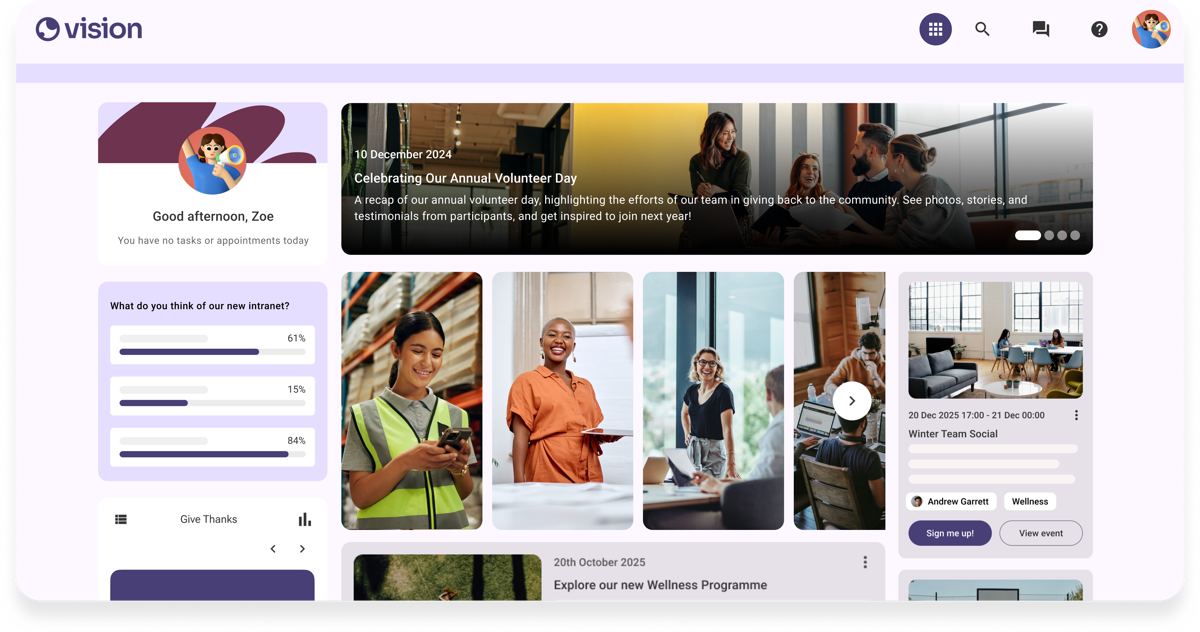
Oak Engage employee intranet dashboard.
Oak Engage is a modern intranet platform designed to
connect frontline, desk-based and remote employees
through one digital workplace. It combines targeted
communications, AI-powered search, workplace resources
and employee engagement in a mobile-first experience.
Unlike a complete replacement for Microsoft 365,
Oak can work alongside SharePoint, Teams and Outlook.
SharePoint can remain the source of truth for documents
while Oak provides a more accessible employee-facing
intranet.
Key features
Mobile intranet for frontline and office employees
Smart Delivery for targeted communications
AI-powered workplace search
Microsoft 365, SharePoint and Teams integrations
Social communities, recognition and surveys
Content management and intranet analytics
Why choose Oak over SharePoint?
Designed to reach employees without regular desktop access
Personalised communication based on employee requirements
Improved employee experience without replacing existing Microsoft systems
Access to workplace knowledge through one interface
Published evidence of adoption among frontline workforces
Best fit:
Organisations with substantial frontline and deskless
workforces that need a more accessible intranet
without abandoning their Microsoft 365 investment.
Customer evidence:
Five Guys reported 97% employee app adoption, while
Sevita reported 84% adoption across 42,000 employees.
These are customer outcomes, not controlled
comparisons against SharePoint.
What to consider:
Organisations wanting to replace SharePoint's entire
document management and Microsoft 365 infrastructure
should assess which capabilities Oak complements
rather than replaces.
2. Jive: best for enterprise collaboration and knowledge sharing
Best for: Employee communities, enterprise discussions and collaboration
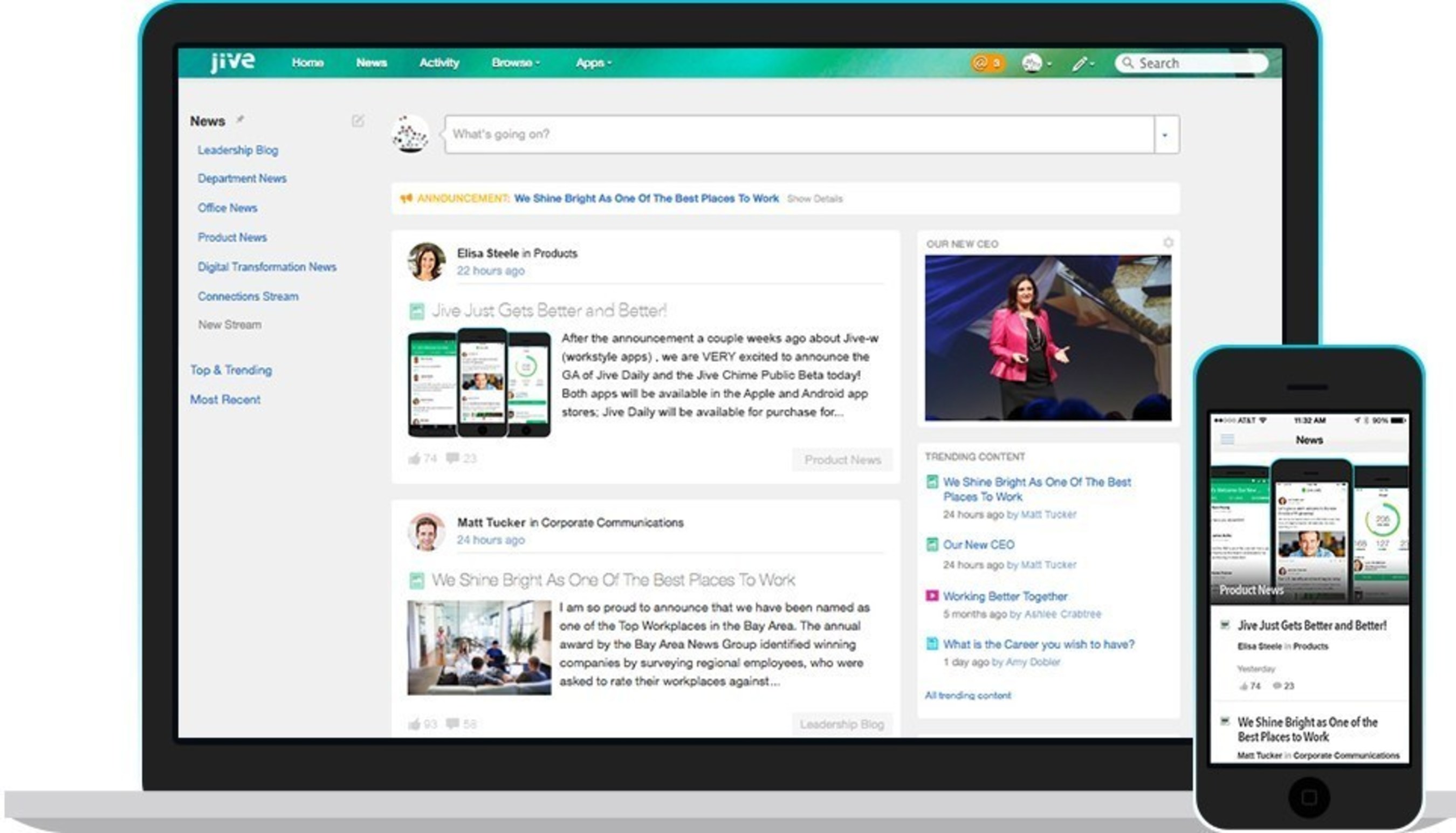
Jive intranet interface from earlier product materials.
Jive is an enterprise collaboration platform focused on bringing workplace conversations, employee knowledge and project communities together in one environment.
While SharePoint is commonly used for document management and structured intranet sites, Jive places greater emphasis on social collaboration, shared discussions and discovering expertise across an organisation.
Key features
Employee communities and discussion forums
Activity streams and company news
Collaborative knowledge management
Employee profiles and expertise discovery
Mobile access to shared workplace information
Team collaboration and project spaces
What to consider
Confirm current supported features and product availability
Check Microsoft 365 integration requirements
Evaluate navigation across large employee communities
Assess content migration from SharePoint
Test mobile usability and administrator requirements
When to choose Jive over SharePoint: Consider Jive when your main priority is building an employee collaboration environment where people can exchange knowledge, participate in communities and find colleagues with relevant expertise, rather than primarily managing structured documents.
The screenshot shows an earlier Jive interface; request a demonstration of the currently supported product.
3. HCL Connections: best for enterprise knowledge communities
Best for: Collaboration, employee expertise and knowledge sharing
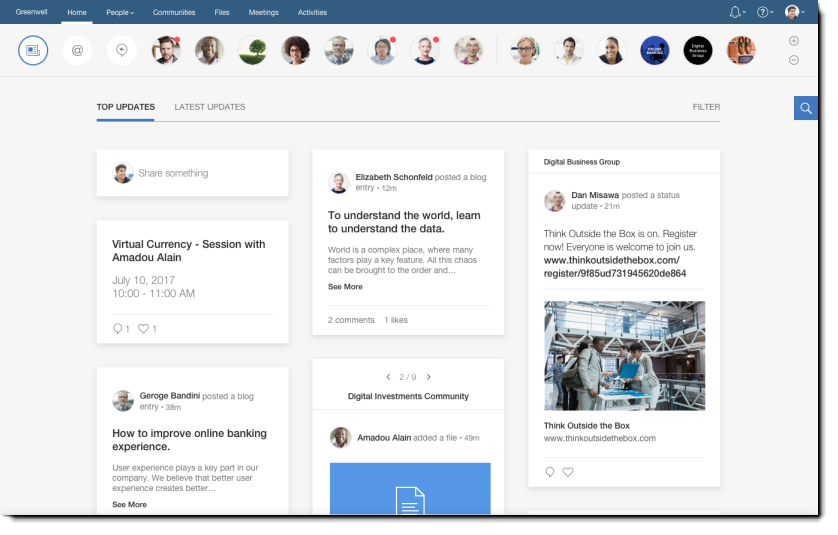
HCL Connections Orient Me homepage, version 7.
HCL Connections is a digital workplace collaboration platform designed to connect employees, expertise and workplace information through personalised communities and shared content.
As a SharePoint alternative, HCL Connections is particularly relevant for organisations looking to improve collaboration across departments and make internal knowledge easier to discover.
Key features
Orient Me personalised employee homepage
Community workspaces and shared discussions
Expertise discovery and employee profiles
Collaborative document and file sharing
Team activities and project coordination
Mobile access to workplace information
What to consider
Potentially complex collaboration environments
Content navigation and information governance
Document editing and version control requirements
Integration with existing Microsoft applications
Ongoing administration of employee communities
When to choose HCL Connections over SharePoint: Consider HCL Connections when employees struggle to find internal experts, share knowledge between departments or work together across communities. Its emphasis is on connected collaboration rather than simply replacing document libraries.
4. Simpplr: best for AI-powered intranet search and usability
Best for: Modern employee experience and simplified intranet management
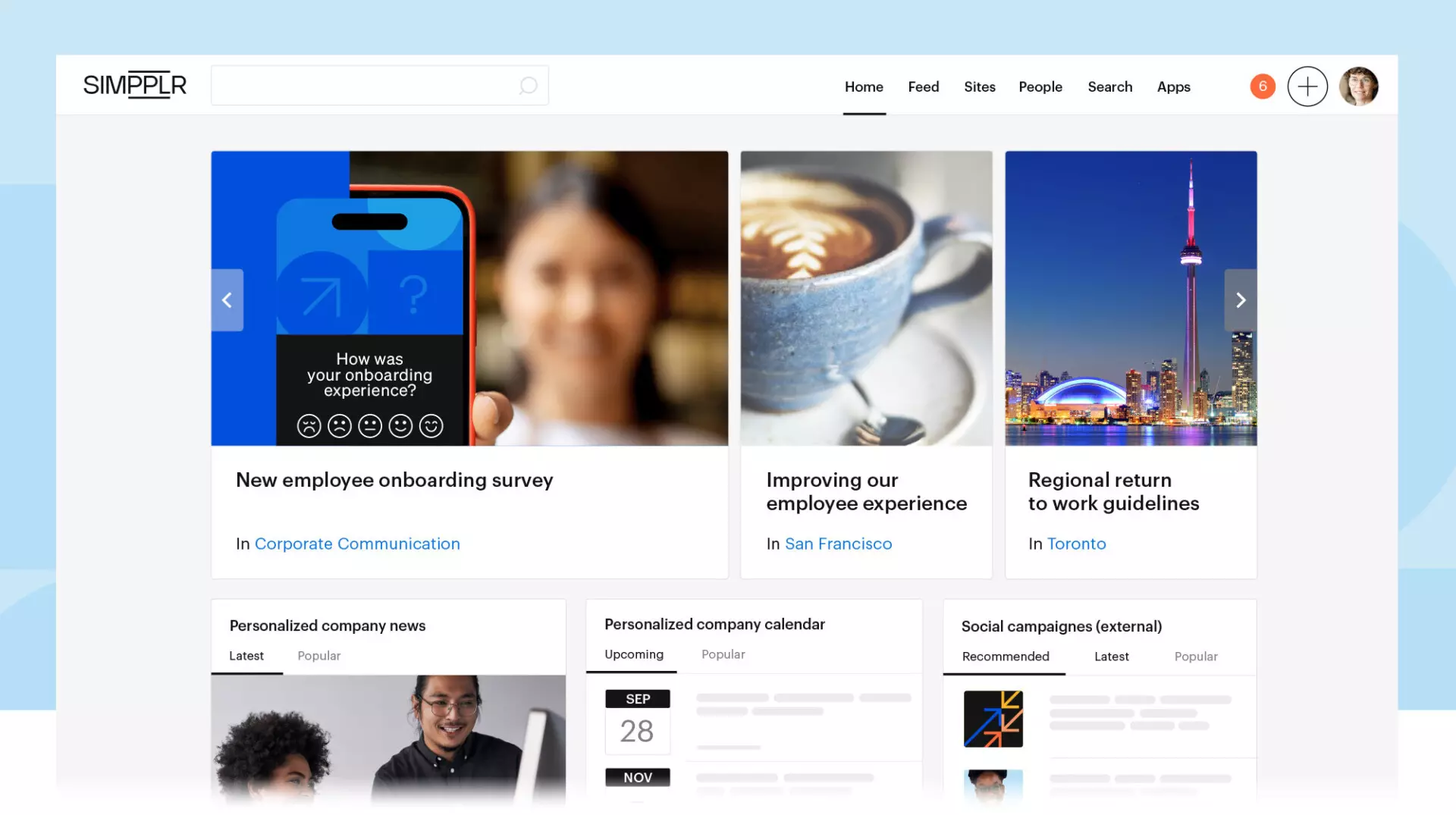
Simpplr employee intranet homepage.
Simpplr is an AI-powered employee experience platform that helps organisations communicate, share knowledge and provide personalised intranet content through one interface.
Compared with managing a traditional SharePoint intranet, Simpplr focuses on reducing the complexity of publishing information and helping employees discover relevant content through AI-assisted search and personalised navigation.
Key features
AI-powered enterprise search
Personalised employee homepages
Targeted news and workplace communication
Employee mobile application
Knowledge management and content governance
Engagement analytics and workplace integrations
What to consider
AI search depends on accurate underlying content
Confirm the availability of advanced AI capabilities
Evaluate integrations with existing document systems
Test permissions and information governance
Assess mobile workflows for frontline employees
When to choose Simpplr over SharePoint: Simpplr is a strong option for organisations looking to improve intranet usability, content discovery and publishing efficiency. It is particularly relevant when employees struggle to find accurate information across multiple SharePoint sites.
5. eXo Platform: best for knowledge and document collaboration
Best for: Open-source digital workplaces and collaborative knowledge management
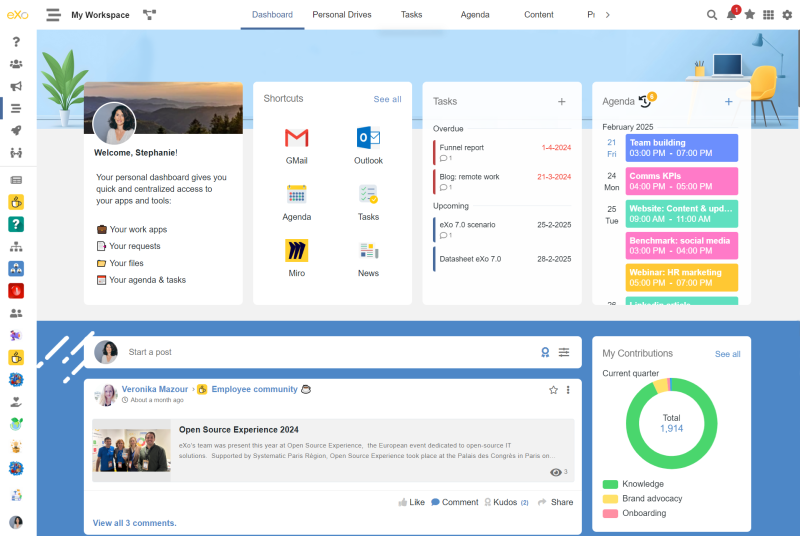
eXo Platform digital workplace interface.
eXo Platform is a digital workplace solution combining intranet content, employee collaboration and knowledge management within one environment.
Unlike employee communication platforms that primarily sit alongside SharePoint, eXo offers a broader set of document and knowledge management features that can potentially replace parts of an existing SharePoint environment.
Key features
Collaborative document management
Knowledge bases and wiki-style content
Document version history and permissions
Social intranet and employee communities
Team collaboration and task management
Flexible deployment and customisation options
What to consider
Technical expertise needed for customisation
Migration of existing SharePoint documents
Hosting and implementation requirements
Integration with existing Microsoft applications
Total cost of administration and support
When to choose eXo Platform over SharePoint: Consider eXo if your organisation wants to consolidate document collaboration, knowledge sharing and employee communities outside the Microsoft ecosystem. It is especially relevant where hosting flexibility and control over the digital workplace are priorities.
6. MangoApps: best for frontline operations and employee experience
Best for: Organisations combining intranet communication and operational workflows
MangoApps personalised employee dashboard.
MangoApps is an employee experience and frontline workforce platform that combines intranet software, internal communication, knowledge sharing and operational applications.
As a SharePoint alternative, MangoApps offers a broader operational approach. Beyond employee news and document access, it supports workplace tasks, scheduling and employee services through a unified digital workplace.
Key features
Personalised employee intranet and mobile app
Targeted announcements and communication
AI-assisted workplace knowledge search
Frontline task and scheduling applications
Employee communities, recognition and surveys
Document access, integrations and HR workflows
What to consider
Broad functionality may exceed intranet-only requirements
Confirm which workforce applications are included
Assess implementation across HR, IT and operations
Compare functionality with existing operational systems
Evaluate employee navigation across multiple applications
When to choose MangoApps over SharePoint: MangoApps is particularly relevant when an organisation wants more than an intranet and intends to connect communication with operational tasks, workforce processes and employee services.
MangoApps vs Oak Engage: MangoApps is worth considering for native workforce operations. Oak Engage is a strong alternative when the priority is targeted communication, employee knowledge and engagement while retaining existing operational and Microsoft systems.
7. Workvivo: best for employee engagement and workplace culture
Best for: Social intranets, employee recognition and company culture
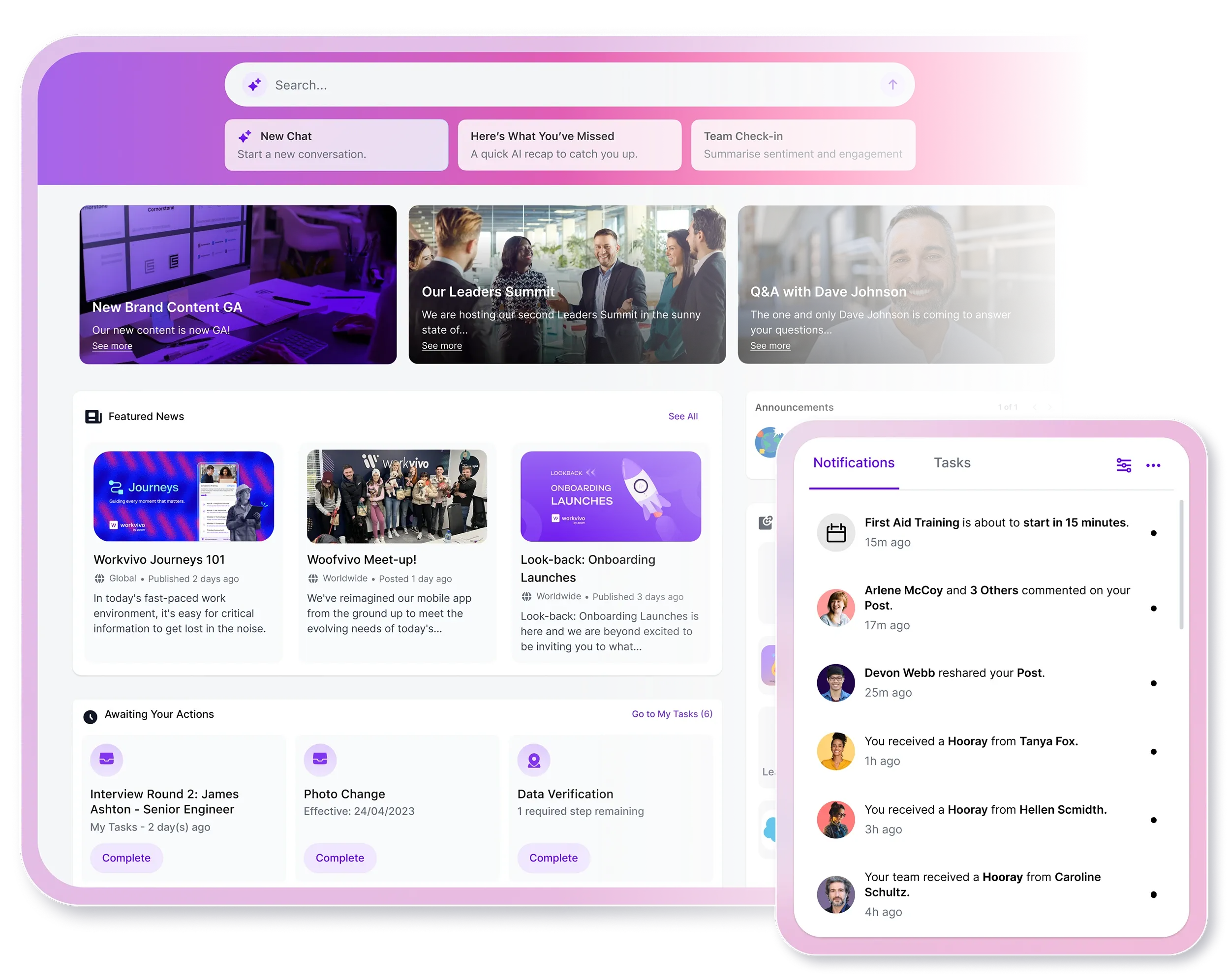
Workvivo employee experience interface.
Workvivo is an employee experience platform designed to connect employees through social communication, recognition, company news and workplace communities.
Rather than concentrating primarily on documents and structured intranet pages, Workvivo introduces a social experience where employees can share updates, interact with colleagues and participate in company culture.
Key features
Social employee news feeds
Peer recognition and appreciation
Employee communities and discussions
Mobile communications and notifications
Surveys and employee feedback
Workplace knowledge hubs and integrations
What to consider
Important announcements must remain visible
Assess structured document and policy management
Evaluate content governance and search
Check Microsoft 365 integration requirements
Consider how social activity is managed across teams
When to choose Workvivo over SharePoint: Workvivo is particularly relevant when the main limitation of a traditional intranet is poor participation rather than document management. Organisations prioritising employee engagement, recognition and workplace culture should consider it alongside more knowledge-focused intranet platforms.
Best for: Large organisations with advanced content governance and personalisation
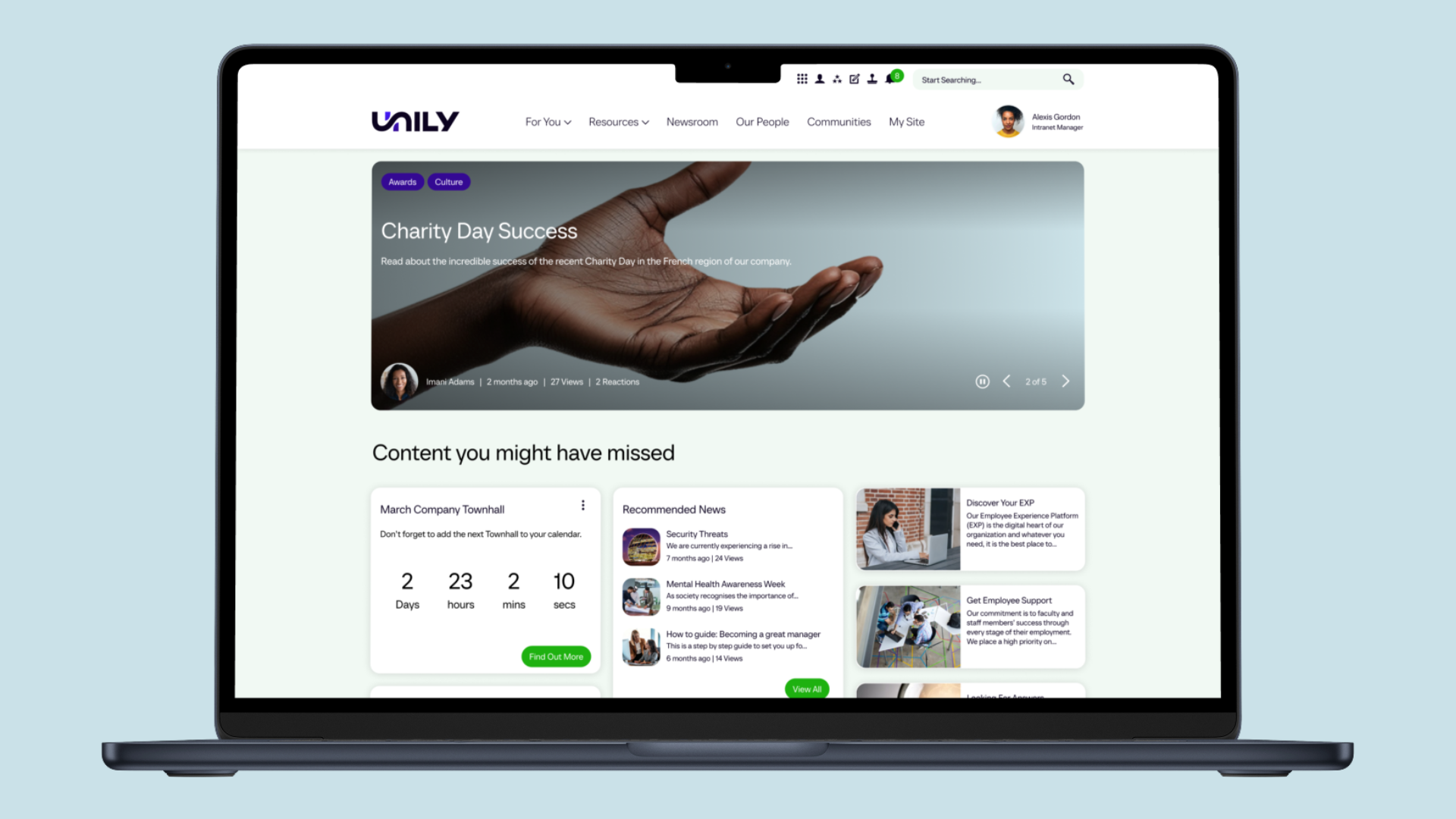
Unily enterprise intranet product example.
Unily is an enterprise intranet platform designed for organisations with complex communication, information management and digital workplace requirements.
It provides an alternative to building and maintaining a customised SharePoint intranet by bringing enterprise content management, personalisation, communication and workplace integrations into a dedicated employee experience platform.
Key features
Enterprise content management and publishing
Personalised employee news and communications
Multilingual and multinational intranet experiences
Advanced permissions and content governance
Enterprise search and workplace integrations
Mobile intranet and employee analytics
What to consider
Complex implementation and configuration needs
Ongoing administration across multiple regions
Enterprise licensing and implementation costs
Integration with existing SharePoint document libraries
Training requirements for content publishers
When to choose Unily over SharePoint: Unily is particularly suitable for large organisations requiring a sophisticated intranet across multiple countries, departments and languages. It provides a dedicated enterprise employee experience that can reduce the need to create and maintain a heavily customised SharePoint front end.
9. Staffbase: best for enterprise internal communications
Best for: Multichannel communications, employee campaigns and audience targeting
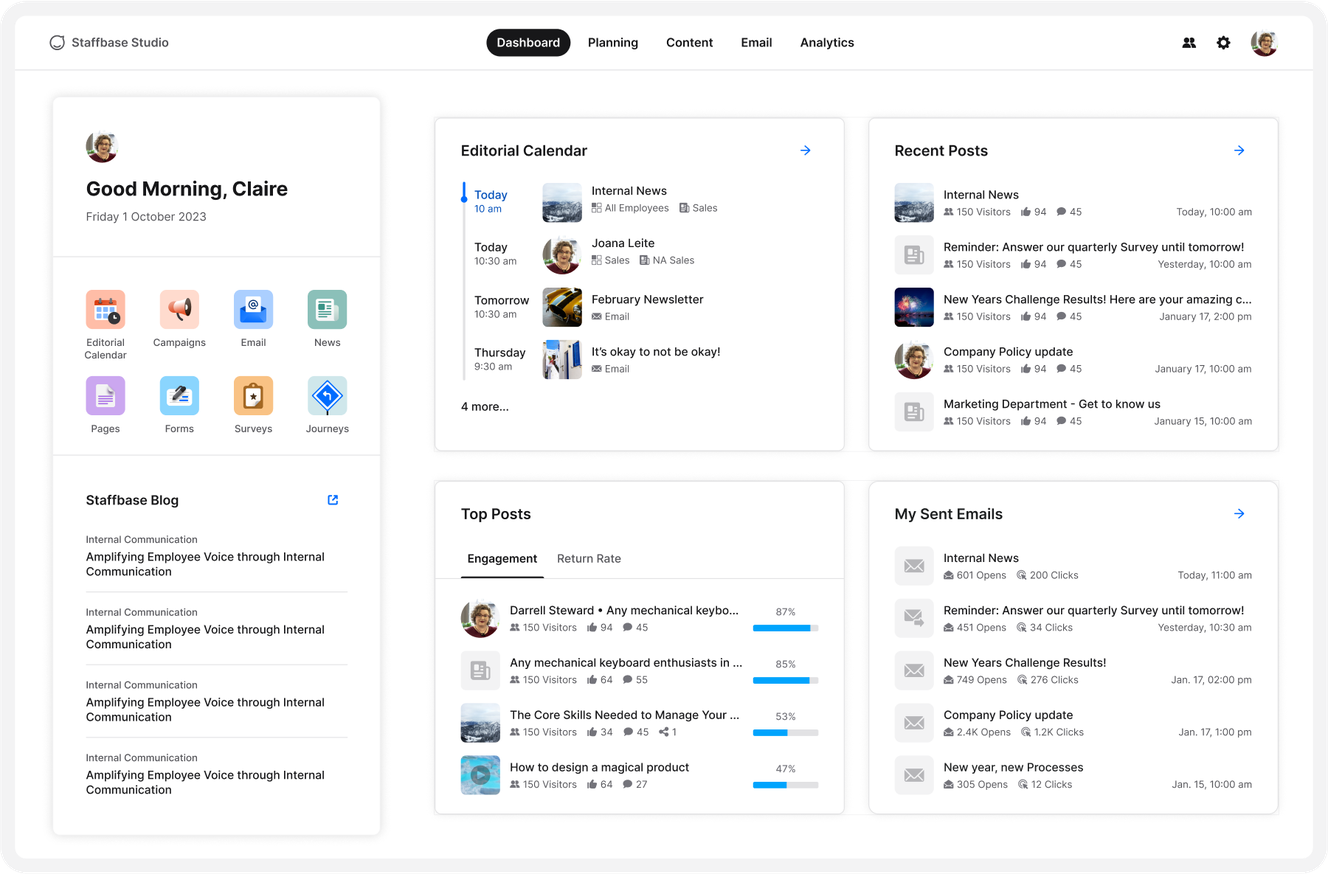
Staffbase Studio communication management dashboard.
Staffbase is an employee communications and intranet platform designed to help organisations manage company information, internal campaigns and employee communication across multiple channels.
As a SharePoint alternative, Staffbase is particularly relevant for internal communication teams needing stronger content targeting, mobile distribution and campaign reporting than they currently achieve through a SharePoint-based intranet alone.
Key features
Employee intranet and mobile application
Multichannel internal communications
Targeted news and push notifications
Employee email and campaign publishing
Communication analytics and reporting
Editorial planning and Microsoft 365 integrations
What to consider
Costs associated with multiple communication channels
Complexity of campaign management
How intranet content connects to knowledge management
SharePoint document integration and governance
Resources required for ongoing administration
When to choose Staffbase over SharePoint: Staffbase is a strong option when improving internal communication reach, targeting and measurement is the main priority. Organisations with dedicated communications teams can use it to coordinate messages across intranet, mobile, email and other employee channels.
10. Claromentis: best for customisable intranets and business workflows
Best for: Employee self-service, document management and workflow automation
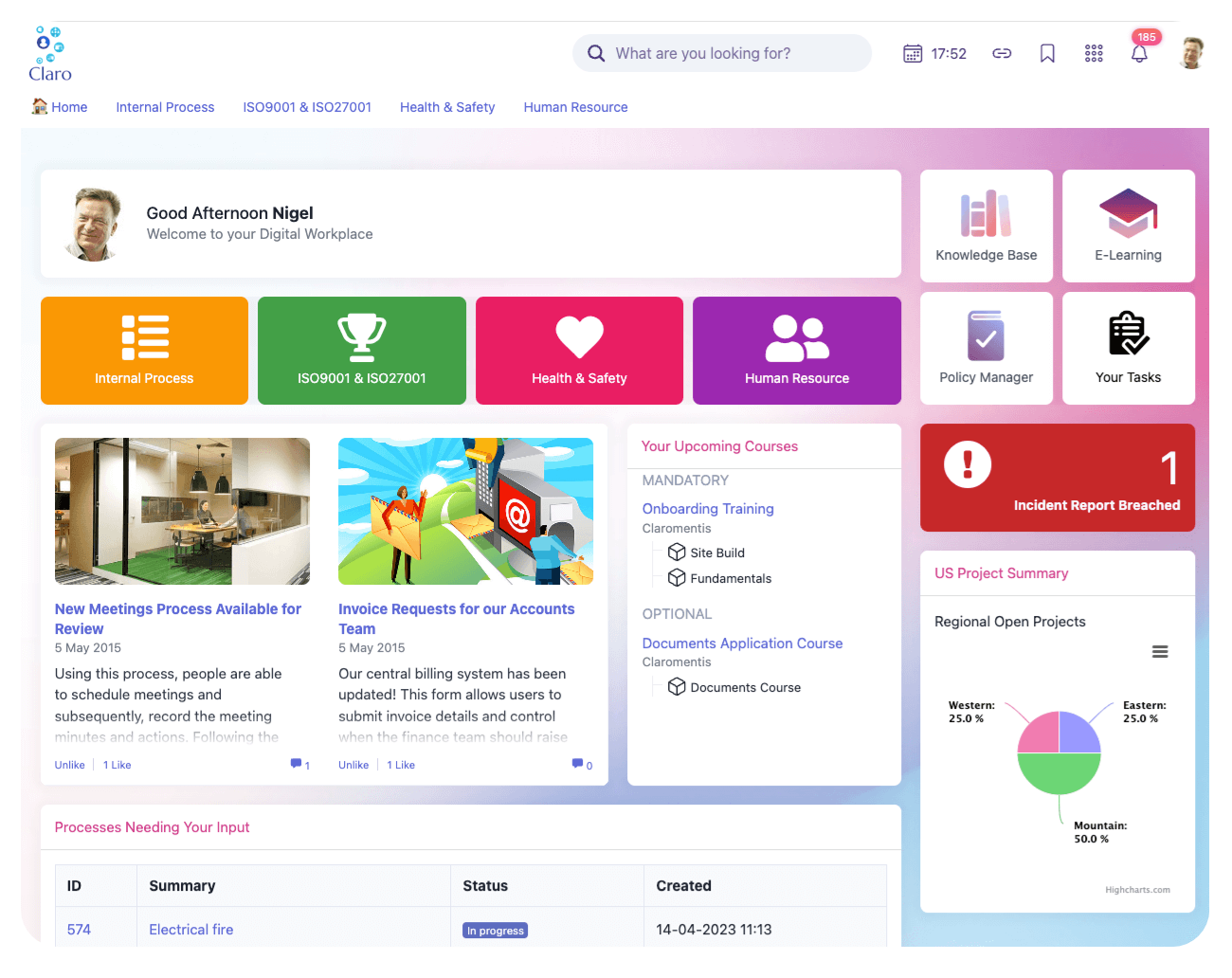
Claromentis digital workplace homepage.
Claromentis is a digital workplace platform combining intranet software, document management and business process applications. It enables organisations to create customised employee portals with information, communication and operational tools in one location.
Compared with a traditional SharePoint intranet, Claromentis offers integrated business workflows, forms and self-service applications alongside content publishing and employee collaboration.
Key features
Customisable intranet page building
Document management and permissions
Employee directories and social applications
Forms, approvals and workflow automation
Knowledge sharing and staff self-service
Employee communication and reporting
What to consider
Granular permissions may require administration
Complex workflows need careful configuration
Assess mobile experience for frontline employees
Confirm reporting and notification capabilities
Evaluate migration of existing SharePoint resources
When to choose Claromentis over SharePoint: Claromentis is particularly relevant when organisations want a configurable intranet that brings employee information, documents, forms and business processes together. It can be a practical option where operational workflows are just as important as internal communications.
11. Firstup: best for personalised employee communications
Best for: Employee communication journeys, multichannel publishing and analytics
Firstup employee experience interface.
Firstup is an employee communications platform designed to help organisations deliver personalised workplace information through multiple communication channels.
Rather than simply publishing content to a SharePoint site and relying on employees to find it, Firstup focuses on reaching specific audiences with relevant updates, automated communication journeys and measurable engagement.
Key features
Personalised employee news and communication
Multichannel content publishing
Employee communication campaign automation
Mobile employee access and notifications
Audience targeting and analytics
Integrations with HR and workplace applications
What to consider
Focus is more communication-led than document-led
Assess knowledge management requirements
Confirm integrations with Microsoft 365
Evaluate campaign setup and administration
Determine whether SharePoint remains the document repository
When to choose Firstup over SharePoint: Firstup is particularly relevant for larger organisations looking to improve the reach, relevance and effectiveness of employee communications. It is a stronger fit where personalised communication delivery is more important than replacing every document management capability of SharePoint.
Conclusion: Which SharePoint alternative should you choose?
The best SharePoint alternative depends on what your organisation needs from its intranet and whether you want a separate solution or a seamless SharePoint integration.
If document storage and collaboration are your main priorities, SharePoint may already provide what you need. However, organisations looking to improve employee communication, engagement and accessibility may benefit from a dedicated intranet platform.
Unily is worth considering for complex enterprise requirements, Staffbase for multichannel internal communications, Workvivo for employee engagement and MangoApps for organisations combining intranet functionality with operational workflows.
For organisations with frontline, remote and desk-based employees, Oak Engage is a strong SharePoint alternative.
Oak brings together targeted communication, AI-powered search, workplace knowledge and employee engagement in one mobile-first intranet. Its effectiveness in distributed workplaces is supported by customer results, including 97% employee app adoption at Five Guys and 84% adoption across Sevita's 42,000 employees.
Importantly, choosing Oak doesn't mean abandoning Microsoft 365. Organisations can retain their existing SharePoint documents and Microsoft tools while providing employees with a more connected, accessible intranet experience.


![11 Microsoft Sharepoint alternatives [your staff will love]](https://cdn.prod.website-files.com/6a1873197db7a603d742abd0/6ae0da49a5ca161de9494c78_SharePoint%20Alternatives%20(1).png)