
The workplace has changed. Employees are no longer restricted to traditional offices, and digital technology now plays a central role in how organisations communicate, collaborate and operate.
From remote and hybrid employees to frontline teams working across multiple locations, businesses need technology that helps people stay connected and access information wherever they work.
This is where the digital workplace comes in. Rather than relying on disconnected applications, organisations can create a more consistent digital experience that supports everyday work.
In this guide, we'll explore what a digital workplace is, the tools involved, its benefits, common misconceptions and how to build an effective digital workplace strategy.
What is a digital workplace?
A digital workplace is the collection of technologies, applications and digital experiences employees use to communicate, collaborate, access information and complete their work. It can include an intranet, communication tools, cloud applications, document management and employee self-service systems, supporting desk-based, remote, hybrid and frontline employees.
What is a digital workplace?
A digital workplace is the digital environment that enables employees to carry out their responsibilities using connected technology.
It isn't necessarily one application or software platform. Instead, it usually combines multiple tools that support different aspects of working life.
These might include internal communication, collaboration, document management, employee services and business applications.
For example, an employee may use Microsoft Teams to communicate with colleagues, SharePoint to access documents and an intranet to read company news or find workplace information.
The technologies work together to create the employee's digital workplace.
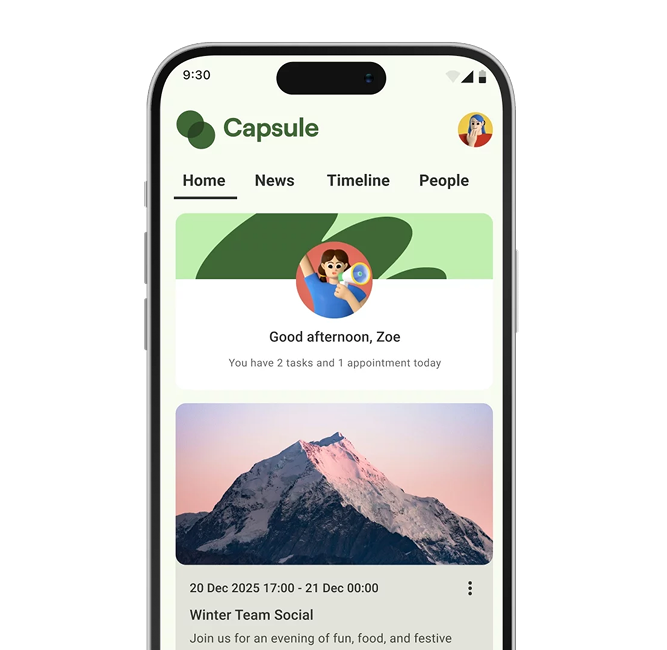
A modern intranet software platform can provide a central point of access to many of these tools, helping employees navigate their digital working environment.
Digital workplace tools and examples
Digital workplaces include a range of applications designed to support communication, collaboration and productivity.
The most suitable combination depends on an organisation's workforce, technology requirements and business goals.
| Digital workplace tool | Examples | Main purpose |
|---|---|---|
| Communication and messaging | Microsoft Teams, Slack, Zoom | Support conversations, meetings and team communication. |
| Intranet platforms | Oak Engage, SharePoint-based intranets | Provide company news, resources and employee communication. |
| Document management | SharePoint, Google Drive, OneDrive | Store, organise and share workplace documents. |
| Collaboration and project management | Asana, Trello, Microsoft Planner | Coordinate projects, tasks and responsibilities. |
| Cloud applications | Microsoft 365, Google Workspace | Provide access to connected workplace applications. |
| Mobile employee communication | Mobile intranet apps, employee apps | Reach staff who work away from desks or offices. |
| HR and employee services | HR systems, payroll and scheduling software | Help employees access relevant workplace services. |
Different applications perform different functions. The aim isn't necessarily to replace every tool, but to make the overall employee experience more accessible and effective.
A connected digital workplaceThe value comes from making different technologies work effectively together. Employees should be able to move between communication, information and business tools without unnecessary complexity.
The evolution of the digital workplace
Digital technology has transformed the workplace over several decades, changing how employees access information and collaborate.
Earlier workplace technology was often centred around desktop computers, office networks and locally managed business systems.
The development of cloud computing, mobile devices and modern collaboration platforms made it possible to access workplace applications from a wider range of locations.
The shift towards remote and hybrid working further increased the importance of accessible digital tools.
Today, digital workplace technology can also support employees who have traditionally been underserved by office-based systems, including retail workers, healthcare employees, manufacturing teams and other frontline roles.
Traditional workplace technology
Office-based systems, desktop access, local networks and communication channels designed primarily for desk workers.
Modern digital workplace
Cloud applications, mobile access, connected systems, personalised employee communication and tools supporting different working patterns.
The objective has shifted from simply providing workplace software to creating a consistent digital experience for employees.
Five common digital workplace myths
Digital workplaces offer significant opportunities, but several misconceptions can affect how organisations approach them.
Digital workplaces reduce collaboration
Some organisations worry that technology makes communication less personal and reduces opportunities for teamwork.
However, digital workplace platforms can provide dedicated spaces for collaboration, communication and knowledge sharing.
Messaging, community hubs and shared resources can help employees work together even when they aren't in the same physical location.
The reality: Technology supports collaboration when organisations use it alongside effective communication practices and clear ways of working.
Digital workplaces are only relevant to office workers
Digital workplaces are sometimes associated exclusively with remote employees and traditional office environments.
In practice, frontline workers can benefit from mobile access to company information, workplace resources and communication tools.
For example, a retail employee might use an intranet app to access company announcements, while a healthcare worker could use it to find relevant organisational resources.
The reality: A digital workplace should support the needs of the entire workforce, including deskless and frontline employees.
Cloud solutions are inherently less secure
Security is an important consideration when introducing cloud-based workplace technology.
However, cloud technology isn't automatically less secure than on-premises infrastructure. Security depends on the provider, configuration, access controls and organisational practices.
Businesses should assess authentication, permissions, encryption, data protection requirements and vendor security credentials when selecting a platform.
The reality: Both cloud and on-premises systems require appropriate security controls and ongoing management.
A digital workplace is finished once implemented
Launching a new digital workplace is only the beginning.
Employee needs, business processes and technology change over time. Organisations need to review platform usage, maintain content and gather feedback.
Employee surveys and usage analytics can help identify opportunities to improve the experience.
The reality: Digital workplace management is an ongoing process of evaluation and improvement.
Digital workplace technology is too expensive
Cost is an important consideration, particularly when organisations already use several workplace applications.
However, the value of a digital workplace should be assessed against the problems it helps solve, including duplicated tools, time spent finding information and communication inefficiencies.
Rather than purchasing everything at once, organisations can prioritise the technology that addresses their most important needs.
The reality: A digital workplace requires a clear business case, realistic costs and measurable outcomes.
Intranet vs digital workplace: What's the difference?
Intranets and digital workplaces are closely related, but they aren't the same thing.
A digital workplace is the broader environment of technologies employees use to complete their work. An intranet is one platform within that environment.
A modern intranet typically provides access to company communication, workplace knowledge, employee resources and engagement features.
Depending on its capabilities and integrations, it can also provide a central way for employees to access other workplace applications.
| Area | Intranet | Digital workplace |
|---|---|---|
| Definition | An internal employee communication and information platform. | The wider collection of digital workplace technologies and experiences. |
| Primary purpose | Connect employees with news, knowledge and resources. | Support employees in completing their work using digital tools. |
| Technology | Usually one platform with integrated features. | Multiple applications, systems and services. |
| Examples | Company news, directories, search, recognition and communities. | Intranet, messaging, HR, project management and business applications. |
| Employee experience | Can provide a central destination for workplace information. | Encompasses the complete digital experience of working. |
| Relationship | Forms part of the digital workplace. | Can include an intranet and its connected applications. |
The key distinctionAn intranet is part of the digital workplace, while the digital workplace includes the wider technology employees need to do their jobs. A modern intranet can help make those tools easier to access.
The benefits of a digital workplace
A well-designed digital workplace can support employee communication, collaboration, productivity and wellbeing.
The benefits depend on choosing appropriate technology and making it easy for employees to use.
1. Better connectivity and collaboration
Digital workplace tools provide opportunities for teams to communicate and work together across different locations.
Messaging, shared workspaces, communities and employee directories can make collaboration easier.
2. Improved productivity
Employees can lose valuable time searching for documents, navigating systems and requesting information.
Centralised knowledge, clear navigation and connected applications can reduce unnecessary administrative work.
3. Stronger employee engagement
A digital workplace can provide opportunities for employees to participate in conversations, share feedback and connect with their organisation.
Social features and recognition can support company culture across different working environments.
4. Better support for employee wellbeing
Digital platforms can make wellbeing resources, company support and employee feedback channels more accessible.
Recognition and clearer communication can also contribute to a more supportive workplace experience.
5. More consistent communication
Organisations can share important announcements, policies and business updates through appropriate digital channels.
This is particularly valuable for dispersed and frontline teams.
6. Improved access to information
Connected workplace tools can make documents, policies and resources easier to locate.
Employees can spend less time searching and more time completing their responsibilities.
For organisations with employees working away from desks, a mobile intranet app can help make these benefits accessible to a wider workforce.
How the workforce is changing
The shift towards digital workplaces reflects broader changes in how organisations operate.
Employees increasingly work across different locations, use multiple digital systems and expect convenient access to workplace information.
Cloud technology
Cloud-based applications can provide access to workplace systems from different locations and devices.
Mobile connectivity
Smartphones and mobile applications make it possible to reach employees who don't regularly use desktop computers.
Remote and hybrid working
Flexible working arrangements increase the importance of accessible communication and collaboration technology.
Work-life balance
Digital tools can support flexible working, although organisations must also establish healthy communication boundaries.
Different employee needs
Organisations employ people across different generations, roles, locations and working patterns.
An effective digital workplace should account for accessibility, digital confidence, device availability and employee preferences rather than assuming everyone works in the same way.
These changes make employee-centred digital workplace strategies increasingly important.
How to create an effective digital workplace
Building a digital workplace requires more than introducing new applications. Organisations need to understand their existing technology, employee needs and business objectives.
The following six steps provide a practical roadmap.
Evaluate your current technology
Start by reviewing the applications, platforms and systems your organisation already uses.
Identify which tools work well, where employees experience difficulties and whether existing systems complement one another.
Key actions: Review existing software, identify duplicated functions and map gaps in employee access to information.
Gather employee feedback
Employees should help shape the technology they use every day.
Surveys, interviews and workshops can help organisations understand what employees value and where their current digital experience falls short.
Key actions: Include desk-based, remote, hybrid and frontline employees when gathering requirements.
Establish clear objectives
Work with leadership to define what the digital workplace should achieve.
Objectives might include improving internal communication, simplifying knowledge sharing, increasing technology adoption or reducing time spent searching for resources.
Key actions: Define measurable goals, project ownership and success criteria before selecting technology.
Choose and connect the right tools
Select technology that addresses the needs identified during planning.
Consider usability, mobile access, integrations, security, existing systems and implementation requirements.
A modern intranet can provide a central destination for communication and access to connected workplace applications.
Key actions: Prioritise essential capabilities, evaluate providers and avoid unnecessary duplication.
Provide communication and training
Employees need to understand why technology is being introduced and how it benefits them.
Communicate implementation plans clearly, provide appropriate training and support employees through the transition.
Key actions: Create accessible onboarding resources, explain practical benefits and involve employee champions.
Measure and improve continuously
Evaluate how employees use the digital workplace after implementation.
Usage analytics and feedback can help reveal whether employees are finding the information and tools they need.
Key actions: Monitor adoption, review performance against objectives and improve the experience over time.
Start with employee needs, not technologyThe most effective digital workplace strategies begin with the problems employees need to solve. Choose tools that make everyday work simpler, then measure whether they deliver those improvements.
How to choose digital workplace technology
There isn't one digital workplace setup that suits every organisation. Your requirements will depend on workforce size, existing technology and how employees work.
When comparing platforms, consider both the individual features and how the technology fits into your wider workplace environment.
Digital workplace technology checklist
- Accessibility: Can employees access the tools they need across relevant devices?
- Communication: Can important information reach different employee groups?
- Usability: Is the experience easy to navigate?
- Integrations: Does the technology connect with existing systems?
- Security: Are suitable authentication and access controls available?
- Collaboration: Can employees work effectively across locations?
- Analytics: Can you measure usage and employee engagement?
- Implementation: Does the provider offer suitable onboarding and support?
If your intranet will be a central part of your digital workplace, our best intranet software comparison explores leading platforms and what to consider when choosing a solution.
How Oak Engage supports the digital workplace
Oak Engage provides intranet software that helps organisations connect employees, communicate important information and provide access to workplace knowledge.
For businesses managing multiple applications and dispersed workforces, a modern intranet can act as a central destination for company communication and employee resources.
Employee communication
Share relevant company updates, news and announcements through targeted communication features.
Mobile accessibility
Help frontline and deskless employees access workplace information through mobile devices.
Workplace knowledge
Make organisational resources and information easier for employees to find through centralised content and search.
Engagement and feedback
Support employee recognition, workplace communities, surveys and opportunities for participation.
Oak's capabilities can support communication through mobile, desktop and digital signage, helping organisations reach employees across different working environments.
Its integration capabilities also allow organisations to connect the intranet with elements of their wider technology ecosystem.
Explore Oak's intranet software to see how it can support a more connected employee experience.
Digital workplace FAQs
What is a digital workplace in simple terms?
A digital workplace is the collection of digital tools employees use to complete their work, communicate, collaborate and access company information. It can include messaging apps, intranets, document management and business software.
What is the difference between a digital workplace and an intranet?
An intranet is an internal platform for company communication, knowledge and employee resources. A digital workplace is broader and includes the different technologies employees use in their roles. An intranet can form part of that environment.
What are examples of digital workplace tools?
Examples include Microsoft Teams, Slack, Zoom, Google Workspace, Microsoft 365, SharePoint, project management tools and intranet platforms such as Oak Engage.
What are the main benefits of a digital workplace?
Common benefits include easier access to information, improved communication, greater collaboration, better support for flexible working and more opportunities for employee engagement.
How does a digital workplace support frontline employees?
A digital workplace can provide mobile access to company news, resources and employee services. A mobile intranet app is particularly useful for staff who don't regularly work at a desk.
How do you build a digital workplace strategy?
Start by reviewing existing technology, gathering employee feedback and defining business objectives. Then choose suitable tools, plan implementation, provide training and measure adoption and performance.
Is a digital workplace suitable for small businesses?
Yes. Small businesses can benefit from digital workplace technology, but may need fewer applications and simpler integrations. The focus should be on tools that solve practical communication and productivity challenges.
Conclusion: Building a more connected digital workplace
The digital workplace is more than a collection of software applications. It's the digital environment employees rely on to communicate, collaborate and carry out their responsibilities.
As organisations support different working patterns and increasingly dispersed teams, accessible and connected technology plays an important role in employee experience.
By understanding employee needs, choosing suitable tools and improving the experience over time, businesses can build a digital workplace that supports their workforce.
Looking to make your digital workplace more connected?
Discover how Oak's intranet software can help employees access company information, stay connected and engage with their organisation.
