

Blog
Last updated:
April 16, 2026
7
min read
Reaching deskless workers requires a mobile-first strategy. You have to meet employees where they actually work: on the shop floor, in the field, or on the move, via the devices they always have with them. The humble mobile. I’m sure you’ve read the statistic that 80% of the global workforce is deskless, with workers across multiple industries — agriculture, healthcare, manufacturing, logistic — meaning you need to equip your deskless workers with the right digital workplace tools to communicate with them effectively. Email is notoriously inefficient for the frontline; it creates information silos, leads to overload, and lacks read receipts to confirm messages were understood. The most effective organisations prioritise the employee experience (EX) by using a combination of employee apps, digital signage, and face-to-face briefings. When you get this right, your communication has an impact. It drives engagement, reduces operational risk, and gives your frontline a reason to care. Read on to learn how to communicate effectively with your deskless workers.
What is a deskless employee app?
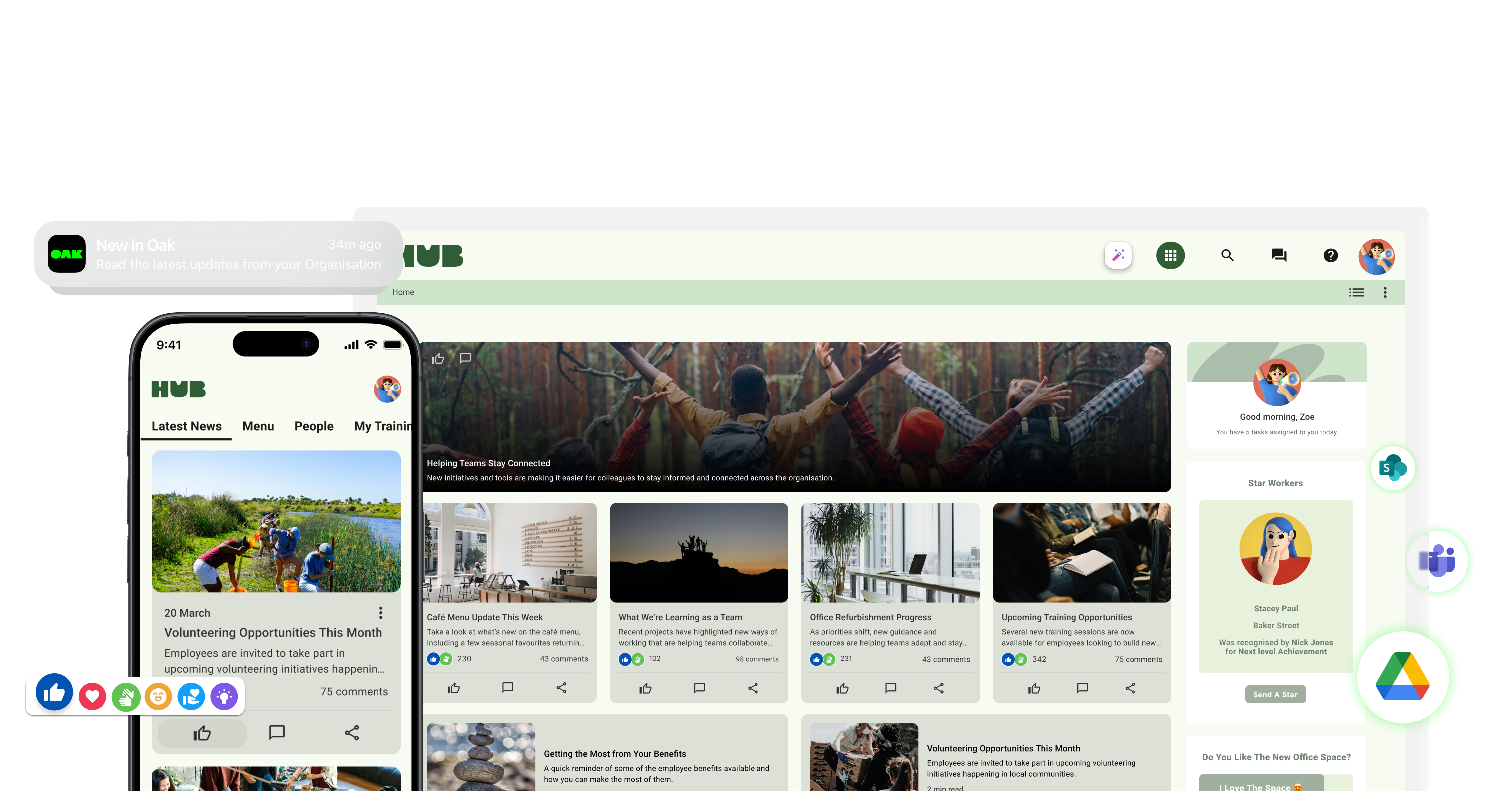
A deskless employee app is a mobile-first platform that gives frontline employees access to company communications, workplace information and essential tools without requiring a desk, computer or corporate email address.
These apps are designed for employees working in locations such as shops, hospitals, factories, warehouses, construction sites and hospitality venues. Employees can use their smartphone to receive targeted updates, find policies, access payslips or rotas, respond to surveys and communicate with colleagues wherever they work.
Some deskless employee apps concentrate primarily on workforce management functions such as scheduling, time tracking and task management. Others, including mobile intranet apps, focus on internal communication, knowledge access, employee engagement and connecting deskless employees with the wider organisation.
Why email doesn’t work for deskless workers
Deskless workers rarely sit at a computer. This creates a massive disconnect that traditional internal comms often ignore.
- Zero inbox access: Most people don't check a work email during their shift and so they need quick, easy to digest updates.
- Shared accounts: Generic logins lead to "not my problem" syndrome and people don’t feel individually connected to comms.
- Invisible updates: Critical alerts get buried under digital noise which leaves huge room for risk.
- The bottleneck: Managers become the only source of truth, where messages get lost in translation and managers suffer from information overload.
Information gaps lead to inconsistent execution and disengaged teams. If communication fails, your customer experience swiftly follows.
“InTouch has allowed us to bring Edinburgh Rugby, Glasgow Warriors, and Scottish Rugby together under one digital roof, ensuring every employee feels part of the same team while still celebrating their unique brand identities. The biggest difference for us is accessibility. People don’t need to be at a desk or have a laptop to stay informed anymore – they’ve got everything they need in their pocket, whether they’re working an event, on the road or moving between our clubs and schools.” - Sarah Bell, Internal Communications Lead at Scottish Rugby
Scottish Rugby reduced direct email traffic by 83%, shifting to an intranet first approach that has created a more informed, connected workforce. They now call ‘InTouch’ their Oak Engage intranet, the central heartbeat of the business.
At a glance: Email vs. Employee apps
What features should a deskless employee app include?
The best deskless employee app is one that employees can access easily, understand immediately and use as part of their working day. The features an organisation needs will depend on its workforce, industry and existing technology, but several capabilities should be prioritised.
Access without a corporate email address
Many frontline employees do not have an individual work email account. A deskless employee app should provide secure alternatives such as SMS registration, QR codes, employee numbers or single sign-on, removing unnecessary barriers to adoption.
A genuinely mobile-first experience
The app should be designed for smartphones rather than simply reproducing a desktop intranet on a smaller screen. Navigation, search, content and workplace actions should all be easy to use during short breaks, between tasks or while employees are on the move.
Targeted communications
Employees should only receive information relevant to their role, location, department or shift. Audience targeting helps organisations avoid overwhelming people with unnecessary updates while making important messages easier to identify.
Push notifications and urgent alerts
Push notifications allow internal communication teams to reach employees quickly with operational changes, safety information and time-sensitive announcements. Organisations should also be able to control which messages trigger notifications so employees are not encouraged to ignore them.
Read confirmations and communication analytics
Sending a message does not confirm that it has reached the intended audience. A deskless employee app should provide reporting on content reach, views, interactions and acknowledgements so communication teams can identify gaps and follow up when necessary.
Search and workplace information
Employees should be able to find policies, procedures, forms, contact details and answers without asking a manager or searching through several systems. Mobile search and structured workplace information help employees self-serve at the point of need.
Two-way communication and employee voice
Effective deskless communication cannot be entirely top-down. Comments, polls, pulse surveys, communities and feedback tools allow employees to ask questions, share ideas and contribute their experience from the frontline.
Multilingual communication
Organisations with multilingual workforces should be able to make important information available in employees’ preferred languages. This improves accessibility, understanding and consistency across different locations.
Security and BYOD controls
If employees access workplace information from personal devices, the app must support secure authentication, appropriate access permissions and clear separation between company information and personal data. IT teams should assess security, device management and data protection before implementation.
Connections with existing workplace tools
A deskless employee app should make it easier to access the systems employees already use. Integrations or direct links to rotas, payslips, learning platforms, HR systems and workplace forms can turn the app into a single mobile entry point for everyday tasks.
7 proven strategies for effective deskless internal communications (no emails needed)
1. Centralise communications through a mobile-first app
Stop using fragmented channels. A mobile-first employee app brings news, rotas, payslips, and social interaction into one place with real-time updates. It becomes the single source of truth your team can actually rely on.
2. Use push notifications for urgent, high-priority updates
Push notifications are your most powerful tool for urgency. It has near-100% read rates and requires no app download. Use it sparingly for safety alerts, shift disruptions, or high-priority changes.
3. Enable two-way communication (not just top-down)
Most organisations push information out but never listen back. Brave brands enable comments, run lightning-fast polls, and capture frontline insights in real time. This turns distribution into genuine engagement.
4. Use digital signage for shared environments
Screens in break rooms, warehouses, or staff areas:
- Reinforce key messages
- Share updates visually
- Reach employees without personal devices
This is especially useful for visibility and repetition of key priorities.
5. Combine digital with human communication
Technology is a tool, not a replacement for leadership. The best teams pair digital updates with daily huddles or briefings. This ensures the message is understood loud and clear.
6. Segment communication by role, location, or team
Not every message is relevant to every employee. Targeting ensures:
- Higher engagement
- Less noise
- Clearer action
Relevance is what turns communication into something employees pay attention to.
7. Track and measure what’s actually working
Without tracking your comms and having visibility over what’s working and what’s not, your communication is solely based on guesswork. And guesswork is never a good strategy. Leading organisations have intranet analytics that measure:
- Who has seen messages
- Engagement levels
- Follow-through on actions
This builds accountability and continuous improvement into communication.
How to choose the right deskless employee app
Start by identifying the main problem the organisation needs to solve. A business struggling to coordinate shifts and track attendance may need a workforce management app. An organisation that needs to improve communication, knowledge access and employee engagement may be better suited to a mobile intranet or employee communication app.
When comparing deskless employee apps, consider:
- Whether employees can join without a corporate email address
- How quickly new users can be onboarded
- The quality of the mobile experience
- Targeting by role, location and employee group
- Push notifications and mandatory acknowledgements
- Search and access to workplace information
- Employee feedback and recognition features
- Multilingual communication
- Security, permissions and BYOD requirements
- Integrations with existing HR and workplace systems
- Reporting on adoption, reach and engagement
- The support available during implementation
The right platform should fit naturally into an employee’s working day. Adding more features will not improve communication if the app is difficult to access, filled with irrelevant content or disconnected from the tools employees actually need.
Common mistakes to avoid when communicating with deskless employees
Many organisations still fall into these traps:
- Desktop-only thinking: Designing only for those working in offices and not on the frontline.
- The content dump: Overloading people with irrelevant fluff, or blanket comms that aren’t tailored for individual people.
- The one-way street: Refusing to listen to feedback through surveys, comments, Q&As.
- Tool fatigue: Introducing five different apps for five different tasks. (At Oak, our app launcher lets teams access all their tools in one place to solve this exact problem!)
The result of these mistakes is more noise rather than better communication.
The shift: from communication to connection
The biggest shift isn’t how you communicate, it all comes down to why you’re communicating something, and how that’s going to be received by the person on the other side of comms. The goal is no longer just to send messages.You need to be focusing on things that actually improve communication and connection, things that actually impact performance at work. Want more resources on improving engagement and communication with deskless workers. Here’s a little library of resources for you:
- Connecting and engaging with deskless workers (Guide)
- How to engage your frontline and deskless workers: 2026 strategy (Blog)
- Employee engagement for deskless workforces: All you need to know (Blog)
FAQs
What are deskless workers?
Deskless workers (or frontline employees) are staff members who fulfill their roles away from a traditional office setting, such as those in manufacturing, healthcare, and hospitality.
What’s the best way to communicate with deskless workers?
The most effective approach is mobile-first, using a mix of employee apps, and face-to-face communication to ensure messages are accessible, relevant, and actionable.
Why are deskless workers often disengaged?
They are typically harder to reach and often excluded from traditional communication channels like email, leading to lack of visibility, unclear expectations, and reduced connection to the organisation.
How do you communicate with deskless workers without email?
Use channels that meet employees where they are:
- Mobile apps
- Messaging platforms
- Digital signage
- In-person briefings
How can you measure communication effectiveness?
Use analytics such as:
- Read rates
- Engagement (likes, comments, responses)
- Completion of actions
- Feedback from employees
What is the best deskless employee app?
The best deskless employee app depends on the organisation’s main requirements. Workforce management apps are often suited to businesses prioritising scheduling, time tracking and task management. Mobile intranet and employee communication apps are better suited to organisations that need targeted communications, workplace information, employee feedback, recognition and engagement in one accessible platform.
Oak Engage is particularly suited to mid-sized and large organisations that need to connect desk-based and frontline employees through a secure, mobile-first intranet. Employees can access targeted communications, company information and engagement features without relying on a desk or corporate email address.
Can deskless employees access an app without a work email?
Yes. Modern deskless employee apps can support alternative registration and authentication methods such as SMS, QR codes, employee numbers and single sign-on. This allows frontline employees to access company information securely even when they do not have an individual corporate email account
How do you measure the ROI of deskless communication?
Focus on behavioural KPIs: read rates for safety briefs, participation in pulse surveys, and the reduction in manager-as-bottleneck inquiries.
Why is frontline engagement lower than office engagement?
Often it's a proximity bias. Office workers have easier access to leadership and information. Closing this gap requires accessible technology that provides a seat at the digital table for everyone.
